發表文章

gradle 如何引用另一個 gradle 檔案

圖片
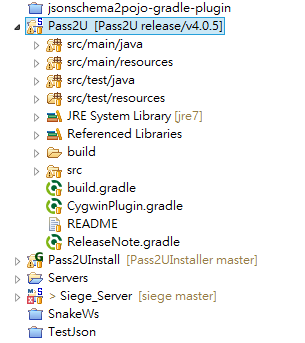
在 build.gradle 上方 在apply plugin 下 增加一個 apply from: 的宣告,如下所示 apply plugin: "java" apply plugin: "eclipse" apply plugin: "tomcat" apply plugin: "cargo" apply plugin: "flyway" apply plugin: "maven-publish" apply from: "CygwinPlugin.gradle" apply from: "ReleaseNote.gradle" 紅色部分就是要額外引用的兩個 gradle 檔案 ,檔案結構如下

如何刪除 remote git branch 和 本地端的git branch

用 Git Bash 輸入以下指令 git push origin --delete
如果發生 Detected both log4j-over-slf4j.jar AND slf4j-log4j12.jar on the class path, preempting StackOverflowError 去check pom.xml 裡的 maven depends ,是否有log 上的衝突 以下是我發衝突的原因 org.slf4j slf4j-log4j12 1.7.5 log4j log4j 1.2.17 slf4j-log4j12 <== 這是slf4 相容log4j 的套件,所以不應該還需要 log4j套件所以修正以下成 log4j log4j 1.2.17 就可以使用了

Stop the Lights [英翻中 練習] (未完成)

I’ll tell you now I don’t believe ,  in any faith or creed 告訴你 現在的我沒有任何信仰 but I know there have been times, someone was watching over me a close call on the road, makes you think about the days they will come and they will go, it’s like I’m walking on a blade and the strangest revelation flashed before my eyes now I’m lighter than the wind, lighter than a butterfly and the rainbows will come and disappear but where’s the pot of gold and the light in your head won’t re-appear if you don’t let it show my heart is pounding like a drum, I light a cigarrette helmet shaking in my hands, that was the closest yet I always felt I had nine lives, but I don’t know which one I’m on like a gambler with a dice, will I shoot or will I run? and the rainbows will come and disappear but where’s the pot of gold and the light in your head won’t re-appear unless you change the way you look at the world change the way you look at your world and the rain that’s running down my face is hiding the te...

[Java] 繼承複寫之探討

圖片
先來探討 Return 值得複寫 先來撰寫一個父類別 TestP.java 如下 import java . io . InputStream ; public class TestP { public void setInputStream ( InputStream is ) { } } 最基本的複寫 import java . io . InputStream ; public class TestP { public void setInputStream ( InputStream is ) { } } 請看InputStream的樹狀結構 測試1 : 先用父類別 Object import java . io . InputStream ; public class TestS extends TestP { @ Override public void setInputStream ( Object is ) { super . setInputStream ( is ) ; } } 運行結果有錯誤 測試2 : 用子類別測是 import java . io . FileInputStream ; import java . io . InputStream ; public class TestS extends TestP { @ Override public void setInputStream ( FileInputStream is ) { super . setInputStream ( is ) ; } } 結果還是錯 結論 參數的複寫,需要型別完全一樣,才能算是複寫,不然都是多形

[Android] 控制 Selector 狀態,以 checked 為例

圖片
基本上selector是為了處理不同狀態有不同的顯示 先來介紹基本的selector的用法(以下是參考 http://www.mkyong.com/android/android-imagebutton-selector-example/   這篇大大寫的) 使用時機 : 基本上Android 有很多狀態,例如 select , check ,  pressed ,  focused ,等等狀態,如果都要用程式來控制這些狀態的UI顯示,那麼對程式的控制和可讀性就會變差,最好的方式就是透過" selector" 1. 準備各種狀態的素材 button_normal_green.png  –  一般狀態的圖示 button_focused_orange.png  – 取得焦點後的圖示 button_pressed_yellow.png  – 按下時的圖示 2. 定義各種狀態對應不同圖檔之設定檔 在 “ res/drawable/ ” 目錄下, 創建 “ new_button.xml “. 這個名稱,將會變成系統的資源 :  @drawable/new_button . File : res/drawable/new_button.xml version = "1.0" encoding = "utf-8" ?> xmlns:android = "http://schemas.android.com/apk/res/android" > android:drawable = "@drawable/button_pressed_yellow" android:state_pressed = "true" /> android:drawable = "@drawable/button_focused_orange" android:state_focused = "true" /> android:drawable = "@draw...
[android]android attributeset 用法與時機

圖片
用得時機 自己客製化的View 有用到LayoutInflater 需要使用的人動態改變View禮拜的屬性 範例說明 簡單的圖片在上,文字在下的View Layout檔 < RelativeLayout xmlns : android = " http : // schemas.android.com /apk/res/android " xmlns : tools = " http : // schemas.android.com /tools " android:layout_width = " match_parent " android:layout_height = " match_parent " android:paddingBottom = " @dimen/activity_vertical_margin " android:paddingLeft = " @dimen/activity_horizontal_margin " android:paddingRight = " @dimen/activity_horizontal_margin " android:paddingTop = " @dimen/activity_vertical_margin " tools:context = " .MainActivity " > < LinearLayout android:layout_width = " 100dp " android:layout_height = " 100dp " android:orientation = " vertical " > < ImageView android:layout_width = " match_parent " android:layout_height = " wr...